

Updating the CompilerDetector.exe Utility File - For PSCAD Version 5.1 and Newer
Updated the file July 22, 2026
A new compiler detector utility, CompilerDetector.exe, was released at PSCAD v5.1.0. In conjunction with the new compiler configuration file, this utility allows the user to select the desired combination of third-party compilers, Intel Fortran compiler, Microsoft Visual Studio, and MATLAB, in the Dependencies tab in the Application Options dialog.
The compiler detector utility, installed alongside PSCAD, can become outdated as newer versions of the third-party compiling software are released. Consequently, newer compiling versions might not be detectable by PSCAD, and therefore not useable.
This article provides the instructions for detecting when the compiler detector utility is outdated, and for updating the utility either automatically or manually.
Note - These instructions are applicable for PSCAD v5.1 and newer.
1. Detecting whether the Compiler Detector Utility is outdated
- Download and run the newest version of the Fortran Medic utility as per Steps (a) to (d) of this article.
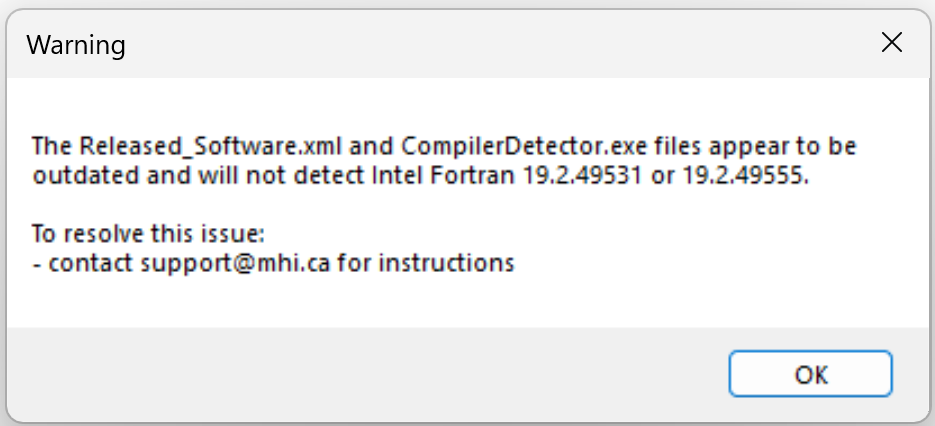
Note: At Step (c), ensure to select Yes to allow the Fortran Medic utility to be able to make changes to your machine. - When the Fortran Medic utility has finished gathering information about your system, scroll down to the PSCAD installation. If an error indicating that the compiler detector utility is outdated, then proceed as per Step 2 or 3 below.

Note - Right-clicking on this error will display a message similar to the following:
2. Automatic Update of the Third-Party Compiler Detector Utility
Not available at this time.
3. Manual Update of the Third-Party Compiler Detector Utility
Note - This procedure will require Windows Administrator permissions.
- Locate your outdated "CompilerDetector.exe" file. The file should be located in a path similar to the following:
C:\Program Files (x86)\<PSCADVersion>\
C:\Program Files (x86)\PSCAD\<PSCADVersion>\
- Modify the name of the outdated "CompilerDetector.exe" file.
For example, change it to "CompilerDetector_1.exe"
- Obtain the updated CompilerDetector.exe file, in one of the following manners:
- Request the most recent version of the file from our support desk (support@mhi.ca), or
- Download the file from the link at the bottom of this article, and unzip the file.
Note - This might not be the most recent version.
- Unzip the updated file, and save the unzipped file to a location on your machine where you have User permisions (e.g. Desktop, Downloads).
- Move the unzipped/updated file to your PSCAD program file path, as determined in the first bulleted paragraph above.
- Close any instances of PSCAD, launch PSCAD, and the updated file should be detected and used by the application.