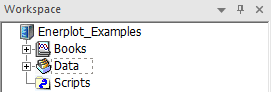
The Workspace pane is the central operating hub within the Enerplot environment. It provides an overview of all books, datasets and scripts currently loaded, within an easily navigable environment.
NOTE: An empty and untitled book and sheet are always automatically created upon launch, or whenever a new workspace is created.
The application and the workspace are separate entities. What this means from the user’s perspective is that an entire workspace may be loaded as a single file (*.epwx), saved or reopened. A single workspace may house multiple books, including sheets, datasets, and scripts, as well as possessing its own unique setting options.
The Workspace pane is used mainly for navigating through the environment. Icons are included for visual differentiation between file types. These icons used are listed below:
 Workspace Branch
 Book
Book
 Sheet
Sheet
 Dataset (Data File)
 Record Group
 Analog Record
 Digital Record
 Script


