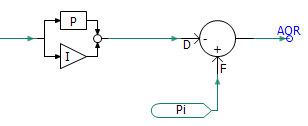
Control signal pathways can be used to help visualize the flow of control signals (i.e. from source to sink) following compilation of the project. The indicators will appear on Wire components that are part of a control signal path. The signal flow indicators appear as arrowheads directly on the Wire.
To enable this feature, bring up the Project Settings dialog (right-click on the project in the Workspace and select Project Settings...). Click the Dynamics tab and select Compute and Display Signal Pathways on Control Wires.
NOTE: The indicators are orientated by default according to the Wire component direction (i.e. towards the end point of the Wire), not the actual control signal flow. If a flow indicator appears reversed, simply reverse the vertexes of the Wire. You must compile the case first before you can view the flow indicators.
Colour Legend for signal type:
REAL
INTEGER
LOGICAL
COMPLEX