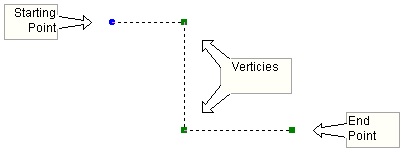
A single wire may possess multiple, orthogonal segments, where each segment combines to create a single, multiple segment wire object (otherwise known as a polywire). Wires with multiple segments may as a whole be moved, rotated, flipped, mirrored, etc. in a single operation. Multi-segment wires may be either constructed manually starting from a single wire segment (by continually Adding a Vertex), or drawn directly using Wire Mode.
Once a multiple segment wire is selected, the entire wire will appear as a dashed line. Each 90° corner, or vertex, will be shown as a small green box. The starting point of the wire is shown as a small blue circle. Whenever the wire is flipped, rotated or mirrored, the action will be centered about the starting point. See Cut/Copy/Paste, Rotate/Mirror/Flip or Reversing the Vertexes for more details on this.
To insert a vertex, right-click over the wire segment where the vertex is to be added (this action will bring up the component context menu). Select Insert Wire Vertex from the menu list. You may also left-click on the Wire where you would like to place the new vertex and then press the v key on your keyboard.
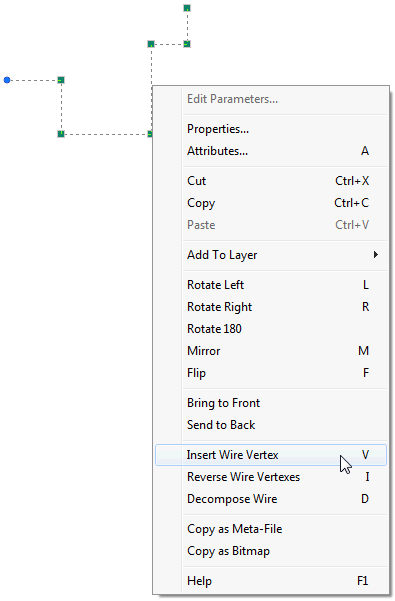
A new vertex grip will appear near where you clicked on the segment. Left-click and hold the new vertex grip and drag it to a new position.
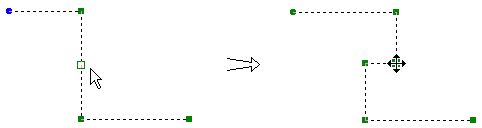
The new vertex may be dragged either horizontally or vertically.
NOTE: You may cancel the new vertex before it is adjusted by simply de-selecting the Wire, or by dragging the vertex over top the original segment and release the mouse button. See Collapsing Segments below.
As mentioned above, the starting point of the wire is shown as a small blue circle. Whenever the wire is flipped, rotated or mirrored, the action will be centered about the starting point. The starting point and end point of the wire may be interchanged at anytime: Right-click over the wire to bring up the pop-up menu. Select Reverse Wire Vertexes from the menu list. You may also, left-click the wire to select it and press the I key on your keyboard.
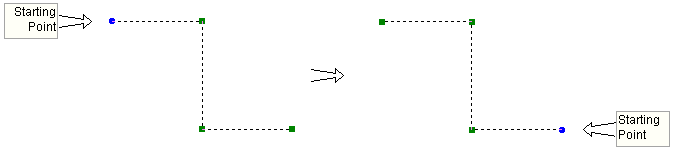
Reversing Wire vertexes is also useful when Composing Wires, as described below.
Two wire segments may be merged or collapsed into a single segment. Left-click on the wire to select it. Left-click and hold a vertex joining the two segments. Drag the vertex so that the two segments are in line with each other. Release the mouse button.

A wire containing two or more segments may be decomposed into individual segments. Right-click over the wire to bring up the pop-up menu. Select Decompose Wire from the menu list. You may also, left-click the wire to select it and press D key on your keyboard.
To decompose a group of multi-segment wires, select all wire entities to be decomposed, by using one of the methods described in Selecting Objects. Right-click on the selection to bring up the pop-up menu. Select Wires | Decompose Pathways from the menu list.
Individual wire segments, or two or more multi-segment wires, may be composed into a single multi-segment wire. Select all wire entities to be composed, by using one of the methods described in Selecting Objects. Right-click on the selection to bring up the pop-up menu. Select Wires | Compose Pathways from the menu list.
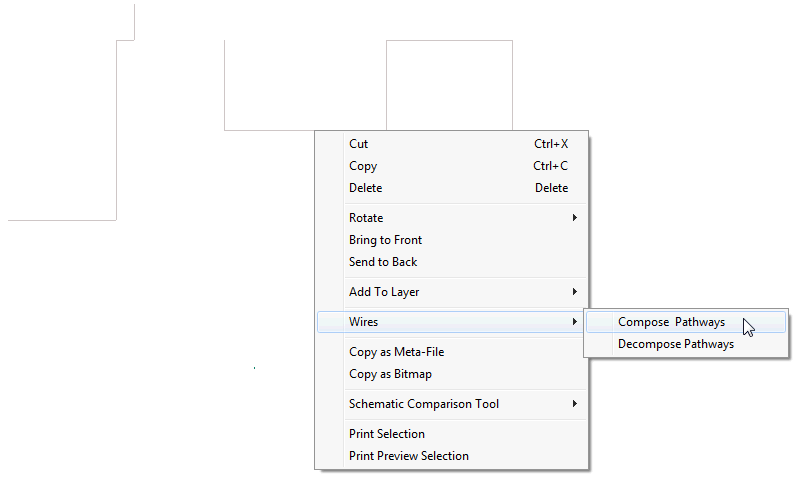
There is one requirement that must be met before composing: All wire entities must be aligned so that the starting point of one is connected to the end point of the next, and so on. If one wire entity is reversed (i.e. starting point is connected to another starting point), then you simply need to Reverse the Wire Vertexes as described above.
For example, consider a group of individual wire segments is to be composed together along with a single multi-segment wire as shown below:
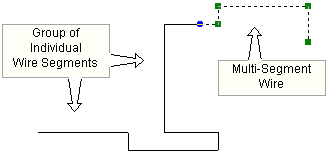
In order for a merge of segments to be successful, each individual wire entity must be aligned from starting point to end point. This means that not only each individual wire segment in the group of wire segments must be properly aligned, but also the multi-segment wire.
Let us assume that all individual wire segments in the group are aligned in the same direction. As indicated above, the multi-segment wire starting point is on the left side. For a successful merge to occur, the individual wire segment to which it is connected must be so aligned as well. A quick test shows that this is not the case:
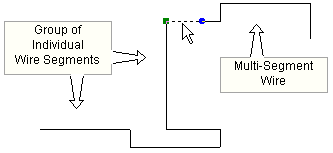
This can be easily rectified by Reversing the Wire Vertexes of the multi-segment wire so that its end point is connected to the starting point of the individual segment to which it is being connected.
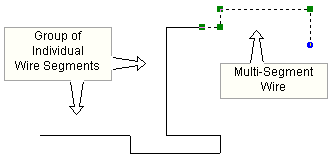
The entire set of Wires may now be successfully composed.
