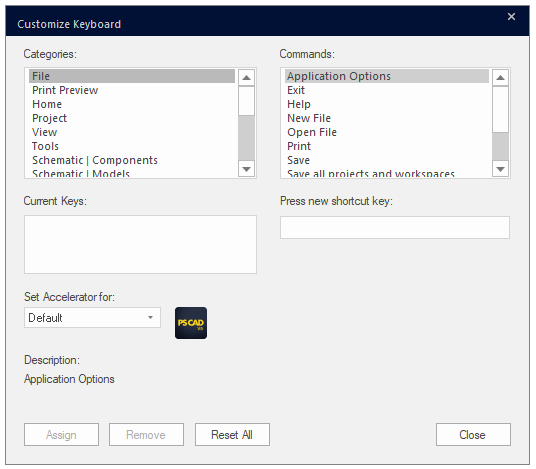
There are many keyboard shortcuts (or hotkeys) available. Hotkeys help to reduce the 'amount of clicks' required for performing a specific task. The following tables list the available keyboard shortcuts.
Note that the 'Ctrl' key may be dropped where indicated (i.e. [Ctrl +]) if Enable Cut/Copy/Paste without 'Ctrl' Key in the Environment category of the Application Options is selected.
|
Shortcut |
Description
|
|
[Ctrl +] x |
Cut selection |
|
[Ctrl +] c |
Copy selection |
|
[Ctrl +] v |
Paste selection |
|
r |
Rotate selection right |
|
l |
Rotate selection left |
|
m |
Mirror selection |
|
f |
Flip selection |
|
s |
Set component sequence. Note that the component must be selected first before pressing this key. |
|
Ctrl + a |
Select all |
|
Ctrl + z |
|
|
Ctrl + y |
Redo |
|
Ctrl + o |
Load project |
|
Ctrl + n |
New project |
|
Ctrl + s |
Save active project |
|
Ctrl + g |
Global Substitutions dialog |
|
Ctrl + u |
Unload the selected project from the workspace |
|
Ctrl + w |
Invoke/cancel wire mode |
|
Esc |
Cancel action |
|
+ |
Zoom in |
|
- |
Zoom out |
|
Ctrl + Shift + Left Mouse Hold |
Pan (dynamic scroll) |
|
Ctrl + Left Double Click |
Edit definition of selected component |
|
Ctrl + Right Click |
Invoke the library pop-up menu system |
|
Left Double Click |
Edit parameters of selected component or navigate into a module |
|
Backspace |
Navigate backwards |
|
Ctrl + Backspace |
Navigate up to parent canvas |
|
F5 |
Refresh canvas |
|
F1 |
Invoke the help system |
|
! " # $ |
Scroll canvas horizontally and vertically |
To apply any of the following shortcuts, simply move your mouse pointer over a wire.
|
Shortcut |
Description
|
|
v |
Insert a wire vertex |
|
i |
Reverse wire vertexes |
|
d |
Decompose wire |
|
Space + Left Click
|
Insert selection into wire
|
To apply any of the following shortcuts, simply move your mouse pointer over a plot area. Note that in some instances, the graph must be selected.
|
Shortcut |
Description
|
|
Insert |
Insert an overlay graph |
|
+ |
Zoom in to graphs |
|
- |
Zoom out of graphs |
|
p |
Zoom previous |
|
n |
Zoom next |
|
x |
Zoom x-axis extents |
|
e |
Zoom x-axis limits |
|
y |
Zoom y-axis extents |
|
u |
Zoom y-axis limits |
|
r |
Reset all extents |
|
b |
Reset all limits |
|
Ctrl + Left Mouse Hold |
Zoom horizontal aperture |
|
Shift + Left Mouse Hold |
Zoom vertical aperture |
|
Left Mouse Hold |
Zoom to box (simultaneous horizontal and vertical) |
|
g |
Toggle grid lines |
|
i |
Toggle tick marks |
|
k |
Toggle curve Glyphs |
|
m |
Show or hide markers |
|
x |
Set X marker |
|
o |
Set O marker |
|
l |
Toggle marker lock-step |
|
f |
Toggle frequency/delta view |
|
q |
Show x-intercept |
|
w |
Show y-intercept |
|
c |
Show cross-hairs (follows curve traces) |
|
s |
Toggle graph size: Full size or sizeable.
|
|
Space Bar |
Switch curves while in cross-hair mode |
|
! " |
Graph frame dynamic aperture adjustment |
To apply any of the following shortcuts, you must be working within the Layers Pane.
|
Shortcut |
Description
|
|
Insert |
Add layer |
|
Delete |
Remove layer |
|
Ctrl + l |
List components |
|
Ctrl + k |
Select components |
|
Ctrl + m |
Merge layers |
|
Ctrl + r |
Rename layer |
|
Hold h |
Highlight components |
|
# $ |
Move the selection within the layers table |
|
Shift + # Shift + $ |
Extend the selection within the layers table |
|
Home and End |
Move the selection to the first and last Layers respectively |
|
PageUp and PageDown |
Move the selection by the size of the window |
|
e, d and i |
Change the state to Enabled, Disabled and Invisible respectively |
To customise shortcuts, right-click on the ribbon control bar and select Customise Quick Access Toolbar.... This will bring up the Ribbon Options dialog. Click the Customise... button to bring up the Customise Keyboard dialog.