
Adding a *.psout File to the Resources Branch
Previous Run Playback enables a replay of a previously run simulation, where the output results have been written in *.psout format (i.e. Save Channels to Disk? Is set to Advanced (*.psout)).
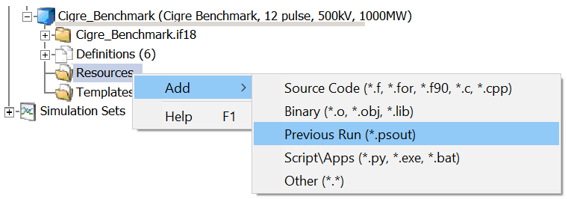
Add a *.psout file resource the the project resources branch by right-clicking on the Resources folder under the project, within the workspace pane. Select the Previous Run (*.psout) option.
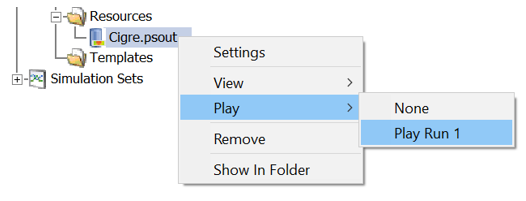
Once added, right-click on the *.psout file resource, select the Play option and then select which run, stored within the file, you would like to play back:
The playback speed is adjustable. The graphs, controls, instruments, and animations will be re-displayed during the playback. The ribbon control bar will automatically display a Playback tab, which provides an assortment of controls:

Previous Run Playback is useful for doing presentations where performing the simulation may take a long time or perhaps the simulation is too fast for in-simulation analysis.
See Also: