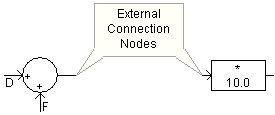
Not Connected
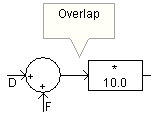
Connected
Inserting Components Into a Wire
A connection between components can be made in one of the following ways:
Overlapping one component port connection over top another.
|
|
|
|
Not Connected |
Connected |
The endpoint of a Wire component can be used to make contact with port connections, or the endpoint another Wire:
|
|
|
|
Not Connected |
Connected |
NOTE: See Valid Connections in the Wire help page for more on connecting objects.
Any point along a Bus component is considered a valid connection point, to which Wires and component port connections may be connected.

It is possible to automatically insert a component inline within a wire, without going through the cumbersome steps of breaking the wire apart. Simply move the component atop a wire, lining up the connection ports, hold down the space bar and release the mouse button. Voilà!

Or simply align the component atop the wire, right-click and select Wires | Insert Selection into Pathways.
It is important to note the difference between an electrical and a data signal when connecting components together. Wires may be used interchangeably as data signal paths, or for connecting electrical nodes. However, it is illegal to connect data signals to/from electrical nodes. For example, the following connection is invalid:

Wires are universal in that they assume the signal type of the nodes they are connected to. If a wire is connected to an electrical node, it will become an electrical wire, for example.
