
MyCentre is a software and information management portal that hosts PSCAD products, including software downloads and certificate licenses for running PSCAD and other MHI products.
Within it, software products belonging to each customer organisation are grouped into one or more workgroups. Access to an organisation's workgroups is managed by the organisation, by designated members of the workgroup with workgroup administrator privileges. Authorised members of an organisation may obtain access to their workgroup by each creating a user account, and having their account linked to the workgroup by a designated local administrator. Users may then simply enter their MyCentre login credentials to obtain access to the products.
A user account is required to be able to obtain access to MyCentre and any authorised products.
Upon registration, permanent licensing for running the Free Edition and some GFortran versions will automatically be assigned. Refer to Setting up the Free Edition.
If authorised, a user account may be linked to a workgroup containing an organisation's software downloads and certificate licenses.
Workgroups are virtual containers for grouping software products, including software downloads and certificate licenses for running PSCAD.
One workgroup containing two permanent licenses for the Free Edition is automatically assigned to each user account. Additional workgroups containing products that are owned by organisations are linked to authorised user accounts by workgroup administrators.
Each workgroup owned by an organisation is normally managed by one or more workgroup administrators. The workgroup administrator is a designated member of the organisation who manages access to the workgroup and can also assign workgroup administrator privileges.
For detailed information on managing a workgroup, please refer to the MyCentre User Manual in the PSCAD Knowledge Base.
Some basic steps for using MyCentre are listed below. For detailed instructions, please refer to the MyCentre User Manual in the PSCAD Knowledge Base.
Register a MyCentre user account at this link.
Log in to MyCentre at this link.
Send a request to your organisation's workgroup administrator.
Note: Contact our Sales Desk (sales@pscad.com) for a listing of workgroup administrators for your organisation.
If you are provided a join code to link your user account to the workgroup:
In the Workgroups tab, select Join Code, and enter the supplied join code:
Your user account will be linked to the licensed workgroup.
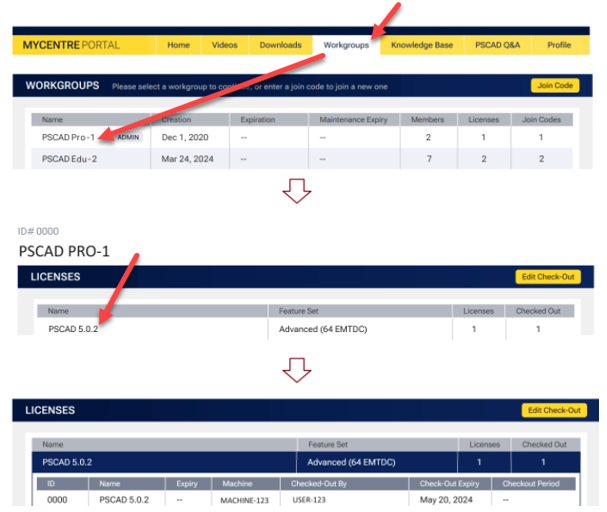
Any authorised certificate license may be displayed from the Workgroups tab: Select the workgroup, then select the license group.
Any authorised download links will be available from your Downloads tab:

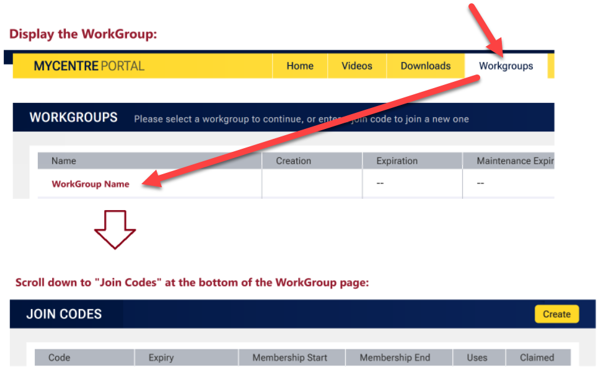
For Workgroup Administrators only, join codes may be viewed and managed from the Workgroups tab: Select the workgroup, and scroll down to Join Codes:
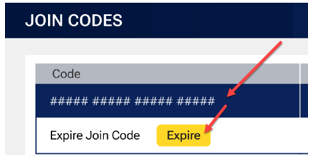
Existing join codes may be deleted (expired):
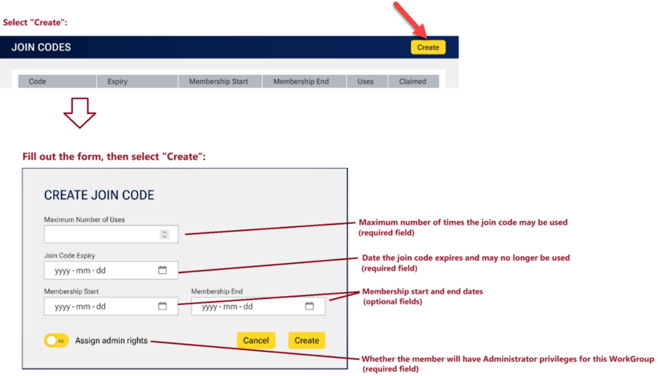
Join codes may be created:
For Workgroup Administrators only, members may be viewed and managed from the Workgroups tab: Select the workgroup, and scroll down to Members. To make changes for any member, select the member from the listing, and the options will display. The options are to remove a user from the workgroup, or to add administrator privileges for that user:

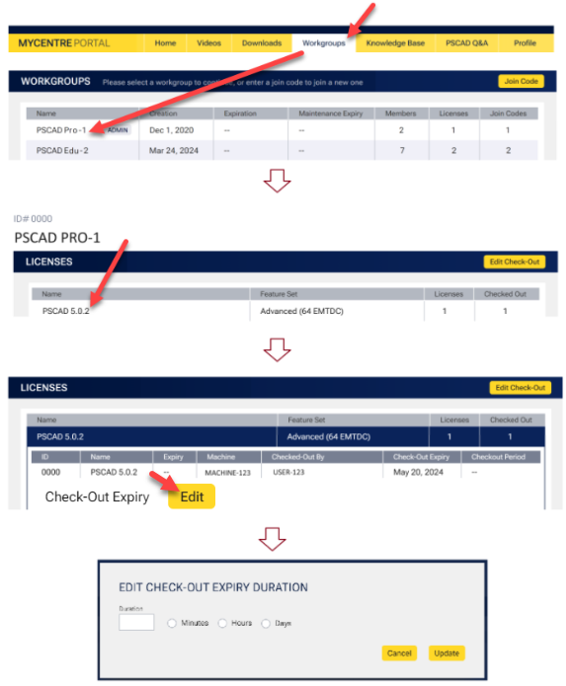
For Workgroup Administrators only, the checkout period for a single license within a license grouping in a workgroup may be amended in the Workgroups tab: Select the workgroup, select the Check-Out Expiry Edit button, enter the new checkout period in days, hours, or minutes, then select the Update button.
Notes:
(i) The maximum checkout period is 28 days (672 hours) (40,320 minutes).
(ii) The minimum checkout period is 30 minutes.
Select User Profile from the drop-down menu, and view and amend your registered information.
Select the Submit button to confirm your changes when done. Note: Your username may not be changed.
Note: Your email address may be changed only by MHI. Send your request to support@mhi.ca. For security purposes, the request must come from the registered email address to be replaced.

Select Update Password from the Profile page, then enter your current password and your new password when prompted:
