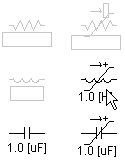
Select an individual object with a left-click on the object graphic. Select a group of objects by one of the following methods:
Press and hold the Ctrl key and then separately select (left-click) all objects to be grouped into one selection. Note that you may also use box select in combination with separate select, provided that the Ctrl key remains depressed.
Press and hold the left mouse button and then drag the mouse pointer so that a box outline appears (box select). Encompass all desired objects to be selected and then release the left mouse button.

To un-group individual objects, hold the Ctrl key and then select (left-click) all objects to be un-grouped. To un-group all objects, left-click on the canvas background.