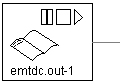
This component can be used to read pre-formatted, columnar text data from a file, and then input this data directly into a PSCAD simulation. The data file may include up to 11 columns of data, each column containing information representing an individual scalar control signal.
Before the data file can be used within a simulation project, the data sampling rate (or time step) must be somehow related to the simulation environment. This is accomplished in one of two ways:
Pre-Defined Time Step: Indicate that the first column of data is the simulation time in seconds (which leaves a maximum of 10 columns remaining for data).
Data Sampling Rate: Indicate a sampling frequency (no time column).
If the time step in the time column of the data file (or the sampling frequency for that matter) is not an integer multiple of the PSCAD simulation time step, then the component will linearly interpolate the data to a value corresponding to the PSCAD simulation time step.
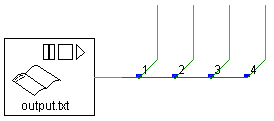
The output of this component is provided to the PSCAD simulation as an output data vector, where each element of the output array represents the corresponding single column of the input data file. If you intend to inject the data from a particular column (or columns) in the file, then you must tap the output array using the Data Signal Array Tap component, as shown below for a 4 column data file.
NOTE: If the input file contains only one column of data (not including time), then the output signal will be a scalar (i.e. dimension 1). Therefore, a Data Signal Array Tap is not required in this case.
|
More: |