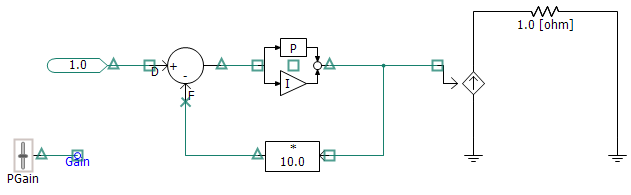
Another feature that is helpful when ordering components is the Signals option in the Canvas Settings dialog. When this option is enabled, PSCAD will use colour-coded symbols, placed on ports and wire termination points, that indicate the control signal data type, as well as other properties as described below.
NOTE: You need to compile the project before you can see these symbols.
The icons used are listed below with explanations:
 Source:
This symbol indicates a signal source point. That is, this particular
signal is being created at this point.
Source:
This symbol indicates a signal source point. That is, this particular
signal is being created at this point.
 Sink: This symbol indicates a signal sink. In other words,
a destination point for a signal source.
Sink: This symbol indicates a signal sink. In other words,
a destination point for a signal source.
 Sink/Source:
This symbol indicates a point where the signal source and sink are
the same.
Sink/Source:
This symbol indicates a point where the signal source and sink are
the same.
 Feedback: This symbol indicates that the signal
passing through the connection point is classified as a feedback signal.
This means that the value of the signal was defined in the previous
time step (t - Dt).
Due to this fact, feedback signals must be written to, and then
extracted from storage each time step.
Feedback: This symbol indicates that the signal
passing through the connection point is classified as a feedback signal.
This means that the value of the signal was defined in the previous
time step (t - Dt).
Due to this fact, feedback signals must be written to, and then
extracted from storage each time step.
Signal Type Colour Legend:
REAL
INTEGER
LOGICAL
COMPLEX