
The Two State Switch is part of a family of specialized, user-interface controls, where the user can manually adjust the output during a simulation run. This family of components also includes the Rotary Switch (Dial), the Variable Real/Integer Input Slider and the Push Button.
This component outputs a manually controlled, two-state REAL or INTEGER type value (a switch). In order to control this component interactively, the user must link it to a Control Panel user-interface. The corresponding control panel interface is shown below.
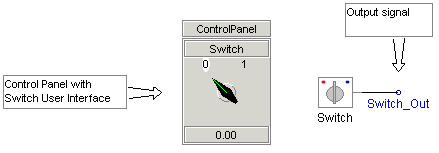
|
More: |
|
Title |
|
Text |
|
A short description (normally one word) about what the switch is controlling. This text will also be used for display in the corresponding Control Panel interface |
|
|
|
|
|
|
|
Group |
|
Text |
|
Enter the name of the Runtime Object Group, to which this component is to belong (default is blank). |
|
|
|
|
|
|
|
Display Title on Icon? |
|
Choice |
|
Select Yes or No to display the Title directly on the component graphic. This has no effect on the display in the corresponding Control Panel interface |
|
|
|
|
|
|
|
Initial State |
|
Choice |
|
Select Off or On. This is the initial state of the switch and is used by default if there is no corresponding Control Panel interface |
|
|
|
|
|
|
|
Output Value in On State |
|
REAL |
Literal |
Enter the output value when the component is in its On state |
|
|
|
|
|
|
|
Output Value in Off State |
|
REAL |
Literal |
Enter the output value when the component is in its Off state |
|
|
|
|
|
|
|
Convert output to nearest integer |
|
Choice |
|
Select Yes or No. If Yes is selected, a NINT (Fortran nearest integer) conversion will be applied to the output signal. |
|
|
|
|
|
|
|
Text for On Position |
|
Text |
|
Enter text to describe the On position. This will appear graphically in the Control Panel user interface |
|
|
|
|
|
|
|
Text for Off Position |
|
Text |
|
Enter text to describe the Off position. This will appear graphically in the Control Panel user interface |