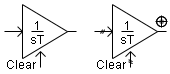
This component is a resettable integrator with non windup limits. The integrator is one of the basic building blocks of control system functions, and may be set to use either trapezoidal or rectangular integration methods. The output can be reset to a predefined value by applying a non-zero integer at the Clear input. A default value of 1.0 second is assumed for the time constant if it's absolute value is less than 10-20.
Interpolation Compatibility
Interpolation compatibility may be enabled provided that Integration Method | Rectangular is selected. When enabled, the Interpolated Time Tag and the polarity of the signal will be considered when calculating the exact integral for that particular time step. Interpolation compatibility may also be enabled specifically on the Clear input of this device. If so, the interpolated information is used to determine the exact time of reset, and hence calculate the exact output value at the next time step following the reset.
If Integration Method | Rectangular is selected without enabling Interpolated Input, then the rectangular step boundary is taken at the middle of the time step. This would give the same result as trapezoidal integration for analog type inputs. If the user wishes to adjust the rectangular boundary to a different location other than the middle of the time step, then user can enable Interpolated Input and make the second element of the input (i.e. the Interpolated Time Tag) a value in the rage 0.0 <= x <= DELT.
More: |
Name for Identification |
Text |
Optional text parameter for identification of the component. |
||
Limits |
|
Choice |
|
Select Internal or External. Limits for the integrator can be supplied externally or internally |
|
|
|
|
|
Resettable? |
|
Choice |
|
Select Yes or No |
|
|
|
|
|
Integration Method |
|
Choice |
|
Select Trapezoidal or Rectangular.
Note that trapezoidal integration should be used whenever possible as it is never unstable. However, if the derivative of the input waveform is not continuous (i.e. dx/dt is infinity at some points) you can get better accuracy with rectangular integration with Interpolation Compatibility: Input enabled (provided the input waveform is interpolation compatible). See Interpolation Compatible Components. |
|
|
|
|
|
Interpolated Input |
|
Choice |
|
Select Yes or No. See Description for more details. This parameter is enabled only if Integration Method | Rectangular is selected. |
|
|
|
|
|
Interpolated Reset |
|
Choice |
|
Select Yes or No. See Description for more details. |
Time Constant |
|
REAL |
Variable |
Time constant [s] |
|
|
|
|
|
Initial Output Value |
|
REAL |
Constant |
The output of the integrator at time t = 0.0 |
|
|
|
|
|
Output Value After Reset |
|
REAL |
Variable |
This is the output of the integrator after a clear pulse is received. This happens only if the Resettable? | Yes is selected |
Upper Limit |
|
REAL |
Variable |
Upper limit for the integrator |
|
|
|
|
|
Lower Limit |
|
REAL |
Variable |
Lower limit for the integrator |