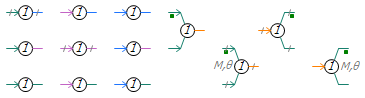
This component is used primarily to convert a data signal of a particular type to another type. For example, REAL to INTEGER.
Most of the type conversions on a typical circuit are from REAL to INTEGER and vice versa. No accuracy is lost when converting from INTEGER to REAL and hence, PSCAD will automatically do this for you when an INTEGER output (source) is connected to a REAL input (sink). However, when a REAL output is connected to an INTEGER input, a warning message indicating the possibility of a loss of accuracy will be displayed in the Build Message Pane. This component can be used to ensure an accurate conversion, and to get rid of the warning messages.
This component can also be used to convert arrays. In addition to that, if the input and output types are the same, then the component can be used to form an array from a scalar input. The value of the scalar input will be assigned to all the elements of the output array.
NOTE 1: Conversion from REAL to INTEGER can be a NINT operation (which stands for nearest integer), in which case a 1.4 will be converted to 1 and 1.6 will be converted to 2, or it can be an INT operation to always round down, in which case 1.4 and 1.6 will be both be converted to 1.
NOTE 2: Short Integer Signed and Short Integer Unsigned are output as INTEGER*4, with the value generated from the appropriate conversion. For example, an input of 40000, will generate INTEGER*4 signals of value -25536 or 7232.