Creating a Transmission Segment Definition
Multiple Instances of the Same Segment Definition
Multiple Instances without Solving Multiple Times
From the perspective of the PSCAD application, transmission segments are not unlike modules: They possess a canvas, input parameters, and a definition. It would seem then that transmission segments could also be multiple instanced, like their module component counterparts – this is indeed possible. However, there are some subtle differences between the two types of component that tend to complicate matters.
Modules are compiled only once no matter how many times the component has been instantiated in the project. This is because a module component does not depend on any of its input parameter (or connection port) values, to define its definition. A transmission segment however, is highly dependent on its length (i.e. the length affects the definition), and since this is an instance-based parameter, each transmission segment instance must be compiled separately.
Surely the segment length could easily be made part of the definition, instead of existing as an instance-based parameter, but then a new segment definition would need to be created whenever the length changed. This would mean that for the same tower configuration, a new definition would need to be created if one segment was 15.0 km and the other was 15.001 km. It seems to make more sense to instead allow a single definition to represent a single tower configuration, and this configuration can be multiply instanced.
The length therefore remains as an instance-based parameter, and hence each individual segment instance must be solved uniquely – even if they are based on the same definition. There is however a way in which to circumvent this: See the section called Multiple Instances without Solving Multiple Times below for details.
The manner in which to construct a transmission segment – be it an overhead line or underground cable – is explained in detail in the previous sections. The component wizard creates a segment definition and also the first instance of the definition. In fact, once you create a new segment, you will find its definition listed in the workspace window, along with its new instance as part of the project module hierarchy.
Once a new transmission line or cable has been created, you may modify it in the same manner as you would a module. From this point forward, any instance of the transmission segment can be instantiated by simply copying and pasting the component on the Schematic canvas.

As discussed above, the final step in multiply instancing a transmission segment is that it must be given a unique Segment Name. By default when the first instance of a segment is created, its instance name is the same as its definition name. This is okay if there is only one instance; however, if more than one instance is present based on the same definition, the segment name must be distinct.
The segment name is a component input parameter – so to modify it, simply open the parameters dialog (i.e. right-click and select Edit Parameters…) and change the name.
If four instances from above are given unique names, they would appear as follows on the Circuit canvas:

When these line instances (all based on the definition TLine) are connected as a valid circuit in the project, each line will be solved individually when the project is compiled.
It is possible to instantiate a transmission segment many times, while ensuring it is only solved once. This is desirable for example, if the transmission line or cable segments possess the same cross-sectional configuration (i.e. definition) and the same length. A practical situation would be perhaps a cross-bonded cable or transposed aerial line, where the transposed segments are all equal.
The above is accomplished by ‘wrapping’ the segment within a module canvas. This essentially makes the transmission line or cable object part of the definition of its parent module. Since a module definition is only solved once, so shall it be for the transmission line. EMTDC will simply access the same Segment Constants (*.tlo/*.clo) file multiple times.
EXAMPLE 1:
A user wishes to model a 3-phase, transposed transmission line, where each segment is of equal cross-sectional configuration, and the same length. The system has 6 segments in total.
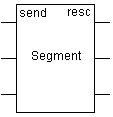
First create a new module component as described in Creating a New Component or Module in Chapter 5. Make sure it has a 3, 1-phase port connection nodes on both the left and the right side of the component graphic.
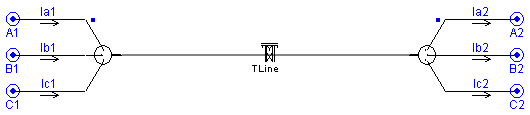
Inside the Circuit canvas of the newly created module, create a new directly connected transmission line segment as discussed above in the section Constructing Overhead Transmission Lines.
|
|
New Module Graphic |
Transmission Segment Wire on Module Circuit Canvas (Inside New Module) |
Instantiate the new module component 6 times and then place transpositions between them.

Although the above system contains six calls to the transmission line within the module, it is only actually solved once, as it is part of the module definition.