Sequencer components are part of a special group of control elements, which can be combined together to form a 'Sequence of Events' based on timers, delays and/or other conditions. Sequencer components are primarily used as a control mechanism for breakers or faults, and provide an unrestrictive alternative to the Timed Breaker Logic and Timed Fault Logic control components. Sequences may also be repetitive.
The input/output of each sequencer component is an integer with a value of either 0 (LOW) or 1 (HIGH). A HIGH output means that the conditions within a particular component have been satisfied, whereas an LOW output means that the conditions have not yet been met. A HIGH input to a sequencer component means that the conditions have been met in the previous block in the sequence, whereas a LOW input means that the previous component has not had its conditions satisfied.
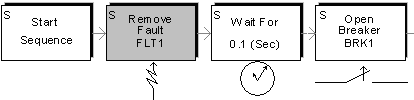
The figure above illustrates a simple sequence of events, in which a fault is applied at start-up and after a delay of 0.1 seconds, a breaker is opened.
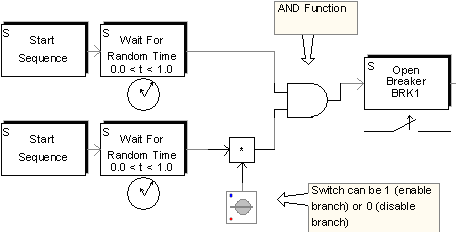
Any PSCAD component can be used with the sequencer components in order to split sequences into multiple sequences, or merge multiple sequences together. For example, an AND function can be used to merge two sequences together, and the output will be enabled only when the original two sequences have had their conditions met. Another example is to use a multiplier component to multiply a sequencer signal by the value of a switch (which can be in a control panel and updated dynamically during the run) to allow sequences to be enabled or disabled. Both of these examples are illustrated below:
Sequencer components can also take input from other PSCAD components, including the Multiple Run component. For example, the angle of a fault can be determined by the Multiple Run component, which can perform 360 runs, incrementing the fault angle by 1° each run, eventually recording the worst case over-voltage.
Sequencer components will appear grey if their state is HIGH (1), and white otherwise. In the first figure above, the 'Remove Fault' part of the sequence was active when the picture was taken during the run.
