Fortran
Compiler Options
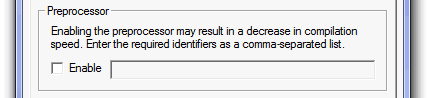
Preprocessor
The parameters contained within the FORTRAN section are used for the control of compiler based error and warning messages. Also, any additional source files, required for the compilation of the project, are indicated here as well.
Compiler Options
The input parameters involved here are outlined below.
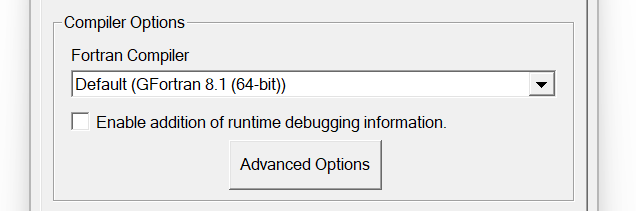
Fortran Compilers
This is simply a drop list of the Fortran compilers available on the local machine, plus an additional Default option. When the Default option is selected, PSCAD will use whatever Fortran compiler is specified in the Application Options. Otherwise, the compiler selection will override that specified in the Application Options, for this project only. In this way, users may run, for example, and PNI simulation where each project involved can use a different compiler.
For more details on this topic, see Parallel Network Interface (PNI).
Enable Addition of Runtime Debugging Information
This option will add some additional information to the build, so as to allow for the effective use of a Fortran debugger. If you have selected this option, you should also select all of the checks available in the Checks section (see below).
When a program crashes on a PC, the operating system brings up a dialog asking if you would like to debug the case. If you select Yes and if you had this option selected, the FORTRAN debugger can load the source file and point to the line of code that is causing the crash.
Advanced Options
Click on the Advanced Options button to bring up the associated dialog.
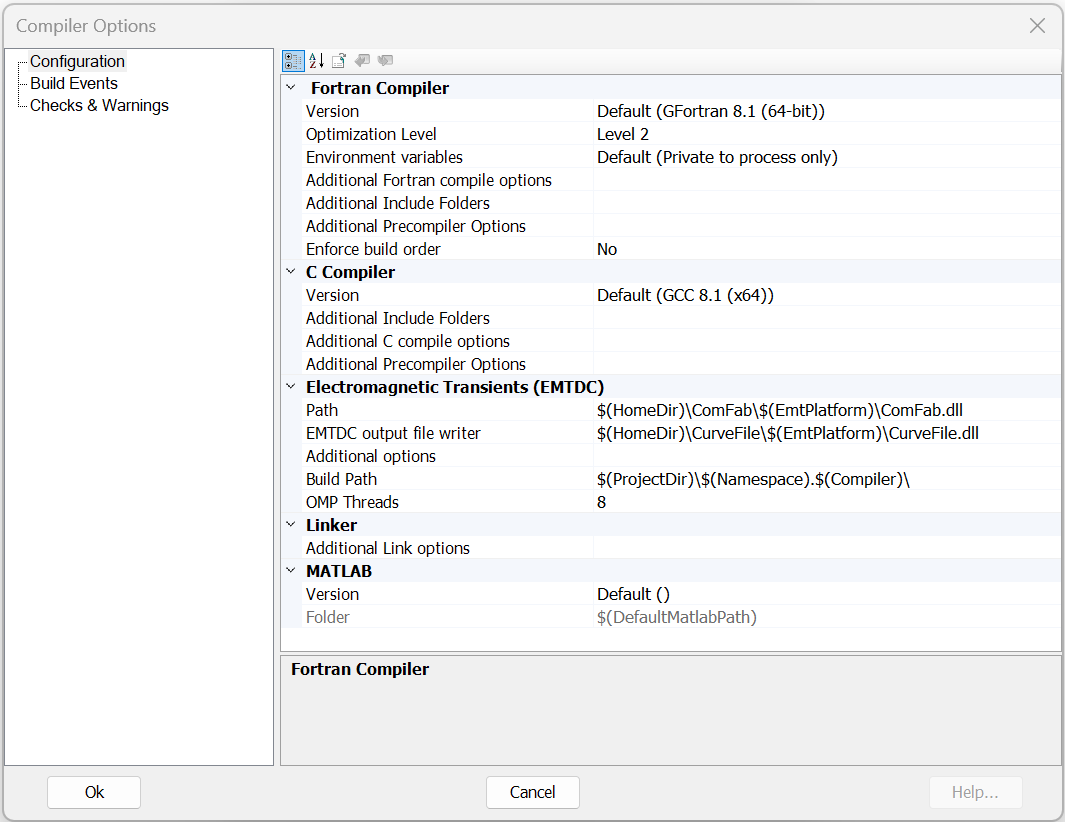
Configuration
These are general options to help provide specific control of how the compilers perform their task. Do not change these options unless you understand what they each do, as they can affect speed optimisation.
Fortran Compiler:
- Version: Selects the Fortran compiler to be used for compilation. If you have more than one compiler installed, you may freely switch without starting or reloading.
- Optimisation Level: Choose either no optimisation, or optimise via levels 1 to 3.
- Environment Variables: Using private, process-based environment settings can eliminate conflicts that can occur when multiple Fortran compilers are installed.
- Additional Fortran Compile Options: Additional command line options provided to the Fortran compiler.
- Additional Include Folders: Provide custom compile options to add to the compiler for this canvas.
- Additional Precompiler Options: Provide custom compile options to add to the compiler for this canvas.
- Enforce Build Order: Ensure the files are built in the same order as they appear in the Resource branch list.
C Compiler:
- Version: Selects the C compiler to be used for compilation. If you have more than one compiler installed, you may freely switch without starting or reloading.
- Additional Include Folders: Provide custom compile options to add to the compiler for this canvas.
- Additional C Compile Options: Additional command line options provided to the C compiler.
- Additional Precompiler Options: Provide custom compile options to add to the compiler for this canvas.
Electromagnetic Transients (EMTDC):
- Path: Specifies the communication fabric, dynamic link library (*.dll) file.
- EMTDC Output File Writer: Specifies the output writer for EMTDC.
- Additional Options: Additional command line options for the EMTDC simulation.
- Build Path: The folder in which PSCAD will build the simulation.
- OMP Threads: The number of OpenMP threads that can be used in the simulation.
Linker:
- Additional Link Options: Additional command line options provided to the EMTDC linker.
MATLAB:
- Version: Selects the preferred installed MATLAB version. If you have more than one installed, you may freely switch without restarting or reloading. Note: The MATLAB interface does not support the GFortran compiler.
- Folder: Display only. This is the auto generated path to the library files associated with the selected MATLAB version. Note: The MATLAB interface does not support the GFortran compiler
Build Events
Pre-Build:
- Action:
- Wait: Waits for the pre-build process to complete before continuing with project build/run.
Post-Build:
- Action:
- Wait: Waits for the post-build process to complete before continuing with project build/run.
Pre-Run:
- Action:
- Wait: Waits for the pre-run process to complete before continuing with project build/run.
Post-Run:
- Action:
- Wait: Waits for the post-run process to complete before continuing with project build/run.
Checks & Warnings
C Compiler:
- Warning Level: Select the warning level to use for displaying warnings while the simulation is building.
Fortran Compiler:
- Warning Level: Select the warning level to use for displaying warnings while the simulation is building.
- Runtime Checks Level: Select the level of runtime checks to perform during runtime. Note: This may affect simulation performance.
Preprocessor
This option provides the ability to enable/disable the Fortran preprocessor. Disabled by default, this option is supported on both the Intel and GFortran compilers. An additional text field is also provided to allow the user to define a comma-separated list of preprocessor identifiers.