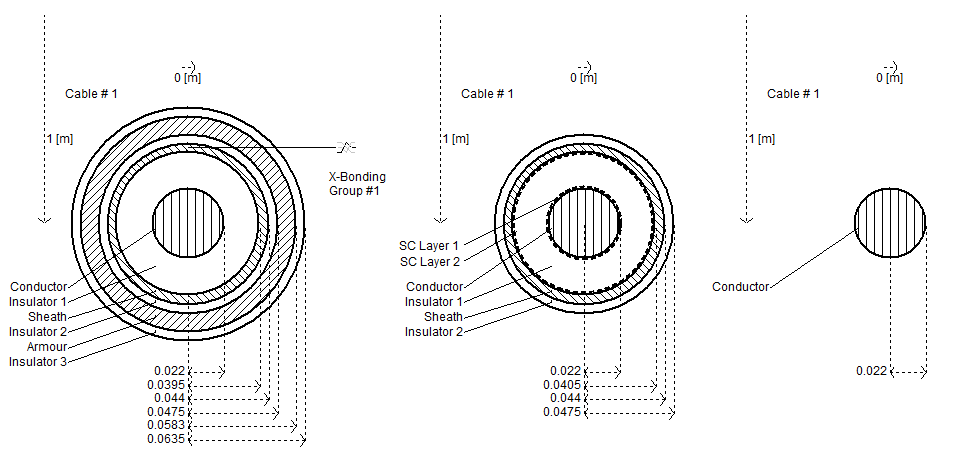
This cable is defined be a centre solid conductor, and can have up to three concentric conductors about the centre. Each conductor is separated by an insulator. The cable cross-section is used to define the geometric position and the conductor/insulator properties of the cable system within the Transmission Segment Definition Editor.
|
More: |
|
Name for Identification |
Text |
Optional text parameter for identification of the component. |
||
|
Cable Number |
|
Choice |
|
Select a number between 1 to 12. This parameter is used for the numbering of multiple cables in the same right of way. |
|
|
|
|
|
|
|
Placement in Relation to Ground Plane |
|
Choice |
|
Choose whether this cable is placed above (Aerial) or below (Underground) the ground plane. |
|
|
|
|
|
|
|
Depth Below Ground Surface |
|
REAL |
Literal |
Enter the depth of the cable centre below the ground plane surface [m]. |
|
|
|
|
|
|
|
Height Above Ground Surface |
|
REAL |
Literal |
Enter the height of the cable centre above the ground plane surface [m].
|
|
|
|
|
|
|
|
Horizontal Translation from Centre |
|
REAL |
Literal |
Enter the translation of the cable centre-point along the horizontal (x) axis [m]. This value is relative to a local x=0 point, which is derived given the position of all cables in this segment. |
|
|
|
|
|
|
|
Layer Configuration |
|
Choice |
|
Select the configuration of the cable layers. C and I represent conducting and insulating layer respectively. |
|
|
|
|
|
|
|
Layer Thickness is Specified As |
|
Choice |
|
Select the manner in which the layer thicknesses are specified. If radial from centre is selected, enter the distance from the centre-point to the outer radius of the layer. |
|
|
|
|
|
|
|
Detailed Graphic Layers |
|
Choice |
|
Select show or hide. |
|
|
|
|
|
|
|
Ideal Cross-Bonding Is |
|
Choice |
|
Choose whether or not to enable or disable the ideal cross-bonding feature. |
|
|
|
|
|
|
|
Cross-Bonding Group |
|
Choice |
|
Select the group number to which this cable belongs. See Ideal Cross-Bonding for more details.
NOTE: Each cable group defines a cross-bonded system of three cables. Each cable in the group should have the same set of cross-bonded conductors. There can be multiple cross-bonded cable groups or a combination of cross-bonded and non cross-bonded cables (ex. a cable system with three cross-bonded and two non cross-bonded cables). Usually in a cross-bonded cable system, only sheaths are transposed at regular intervals. However (if required), any other conductor can also be be transposed.
In some applications, the inner conductor is transposed other than the sheath to obtain a balanced system. This can be accomplished by enabling cross-bonding/transposition of both inner conductor and sheath. In some practical applications, the sheaths at major section points (must consist of three cable sections) of the cross-bonded cable are connected to the ground. This can be approximated by mathematically eliminating the sheath of the three cables in the group (i.e. conductor layer elimination). |
|
|
|
|
|
|
|
Conducting Core/Layers |
|
Choice |
|
Use these options to specify which conductors are to be included in the cross-bonding. See Ideal Cross-Bonding for more details. |
|
|
|
|
|
|
|
Conductor Labelling |
|
Choice |
|
Use these options to provide graphical labels for each conductor in the cable. |
|
|
|
|
|
|
|
Conductors to Eliminate |
|
Choice |
|
Choose which conducting layers to eliminate (if any). Select none to disable conductor elimination. If specify is selected, then you must specify which conductors are to be eliminated in the following parameters. |
|
Resistivity |
|
REAL |
Literal |
Enter the resistivity of the corresponding conductor [Wm]. |
|
|
|
|
|
|
|
Relative Permeability |
|
REAL |
Literal |
Enter the relative permeability of the corresponding conductor. |
|
|
|
|
|
|
|
Inner Radius |
|
REAL |
Literal |
Enter the inner radius of the corresponding conductor. If this is the central solid conductor, enter 0.0 [m] |
|
|
|
|
|
|
|
Outer Radius |
|
REAL |
Literal |
Enter the outer radius of the corresponding conductor. |
|
|
|
|
|
|
|
Thickness |
|
REAL |
Literal |
Enter the thickness of the conducting layer [m]. Note that this parameter is enabled only if Layer thickness is specified as | actual thickness is selected. |
|
Semi-Conducting Layers |
|
Choice |
|
Select whether or not there are semi-conducting layers present in this cable. Semi-conductor layers may only be included between the core and 1st conducting layers. |
|
|
|
|
|
|
|
Relative Permittivity |
|
REAL |
Literal |
Enter the relative permittivity of the corresponding insulator. |
|
|
|
|
|
|
|
Relative Permeability |
|
REAL |
Literal |
Enter the relative permeability of the corresponding insulator. |
|
|
|
|
|
|
|
Outer Radius |
|
REAL |
Literal |
Enter the outer radius of the corresponding insulator [m]. |
|
|
|
|
|
|
|
Thickness |
|
REAL |
Literal |
Enter the thickness of the insulating layer [m]. Note that this parameter is enabled only if Layer thickness is specified as | actual thickness is selected. |
|
|
|
|
|
|
|
Inner Semi-Conductor Layer Thickness |
|
REAL |
Literal |
Enter the thickness of the inner semi-conducting layer (between insulator and core conductor) [m].
NOTE: This value should not be included as part of the conductor or insulator dimensions. The line constants program will take care of the semi-conductor layer automatically, given this thickness. |
|
|
|
|
|
|
|
Outer Semi-Conductor Layer Thickness |
|
REAL |
Literal |
Enter the thickness of the outer semi-conducting layer (between insulator and 1st conducting layer) [m].
NOTE: This value should not be included as part of the conductor or insulator dimensions. The line constants program will take care of the semi-conductor layer automatically, given this thickness. |