
This is an online Fast Fourier Transform (FFT), which can determine the harmonic magnitude and phase of the input signal as a function of time. The input signals are first sampled before they are decomposed into harmonic constituents.
Options are provided to use one, two or three inputs. In the case of three inputs, the component can provide output in the form of sequence components.
The user may select one of the following three FFT block types:
1 Phase: This is a standard 1-phase FFT. The input is processed to provide the magnitudes Mag and phase angle Ph of the fundamental frequency and its harmonics (including the DC component dc).
2 Phase: This is nothing more than two 1-phase FFTs in a single block, in order to keep things compact and organized.
3 Phase: As above, is merely three 1-phase FFTs combined in one block.
+/-/0 seq: This takes a 3-phase input XA, XB, XC and calculates the FFT preliminary output through a sequencer, which outputs positive (+), negative (-), and zero-sequence magnitude and phase components of the fundamental, and each harmonic. The DC components of each phase are also output.
3 Phase SLD: Same as 3-phase above except the input connection is a 3 element array.
+/-/0 Seq SLD: Same +/-/0 Seq above except the input connection is a 3 element array.
The sequence components are computed based on the simple transformation equation:
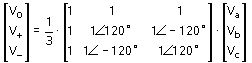
NOTE: Due to the discrete nature of the algorithm, any sub-harmonics or inter-harmonics present in the measured signal will interfere with the output. The measured signal should be free from inter-harmonics and sub-harmonics for accurate results.
More: |
NOTE: For more details on some of these parameters, see On-Line Frequency Scanning.
Name for Identification |
Text |
Optional text parameter for identification of the component. |
||
Type |
|
Choice |
|
Select 1 Phase, 2 Phase, 3 Phase, +/-/0 Seq, 3 Phase SLD, or +/-/0 Seq SLD output |
|
|
|
|
|
Number of Harmonics |
|
Choice |
|
Select 7 (16 S/CBF), 15 (32 S/CBF, 31 (64 S/CBF), 63 (128 S/CBF), 127 (256 S/CBF), 255 (512 S/CBF, 511 (1024 S/CBF) or 1023 (2048 S/CBF)
S/CBF = Samples per cycle of base frequency |
|
|
|
|
|
Base Frequency |
|
REAL |
Variable |
The fundamental frequency (i.e. the lowest frequency of the input signal) |
|
|
|
|
|
Magnitude Output |
|
Choice |
|
Select RMS or Peak for the magnitude outputs |
|
|
|
|
|
Phase Output Units |
|
Choice |
|
Select Radians or Degrees for the phase outputs |
|
|
|
|
|
Phase Output Reference |
|
Choice |
|
Select Sine or Cosine. This determines if the phase output is referenced to a sine wave or a cosine wave |
|
|
|
|
|
Anti-Aliasing Filter? |
|
Choice |
|
Select Yes or No to use the internal anti-aliasing filter |
|
|
|
|
|
Frequency Tracking? |
|
Choice |
|
Select Yes or No to track frequency.
NOTE: When frequency tracking is active, the phase angle reference may change. If this situation occurs, the phase angle outputs should not be used to compare with phase angle outputs of other components. Relative phase angles of harmonics measured from the same on-line frequency scanner will keep their accuracy, however. |
|
|
|
|
|
Frequency Tracking Enable Signal |
|
INTEGER |
Variable |
Frequency tracking can be dynamically controlled via this input signal variable, where enable = 1 or disable = 0. |
Frequency Output VariableFrequency Output Variable
Name for Frequency Output |
|
REAL |
Output |
If frequency tracking is enabled, the tracked frequency can be monitored by the use of this variable |